Techorph HTMS™

Operations

Keep the hotel moving, from the first request to the final inspection.

Give IT, housekeeping and engineering a shared way to log, assign and finish work, so nothing waits in a hallway conversation or a spreadsheet.

$2.50per room/month
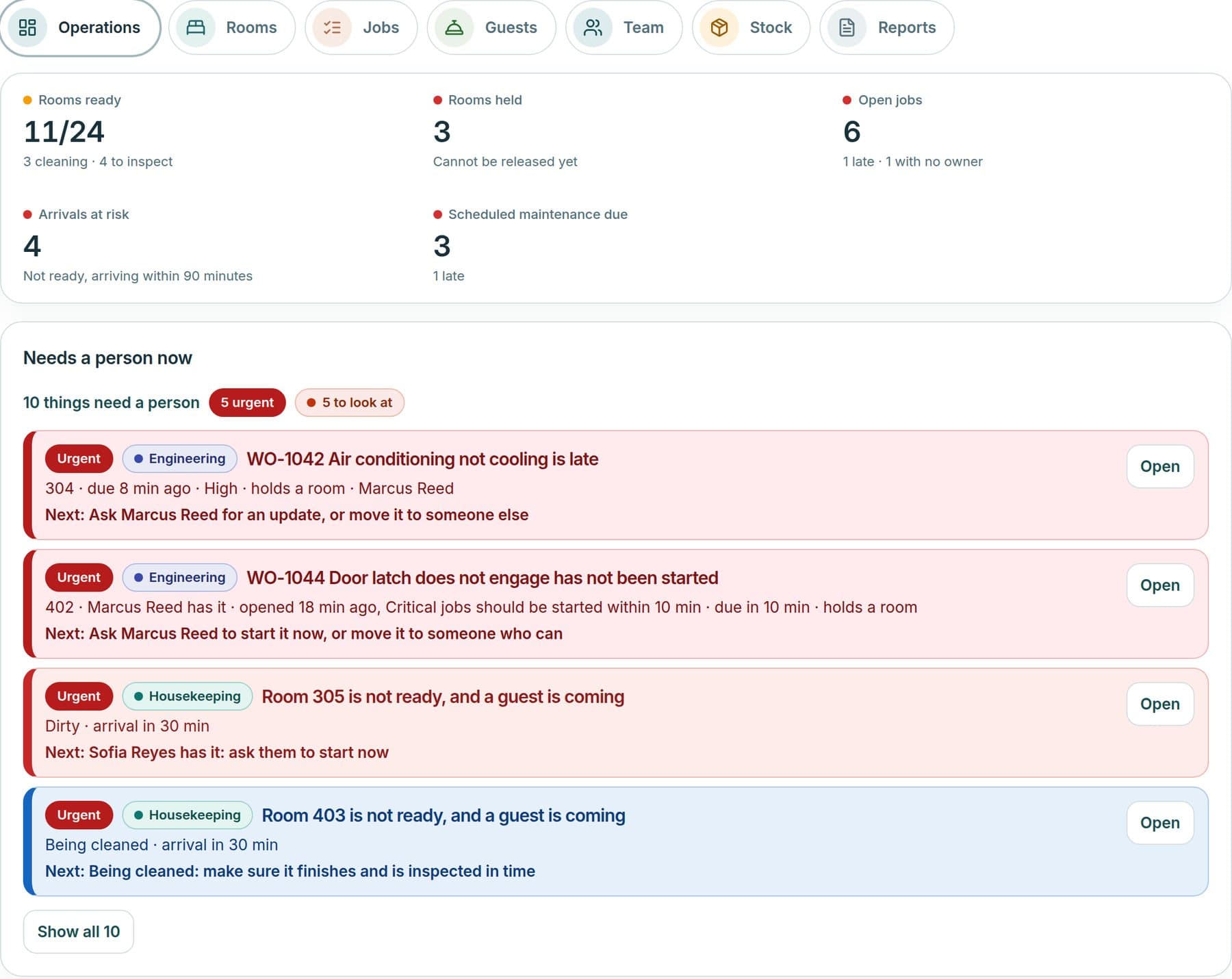
Roomline operations overview: rooms ready, rooms held, open jobs, arrivals at risk and the things that need a person now.
Example screen · Grand Harbour Hotel sample data

See it in action

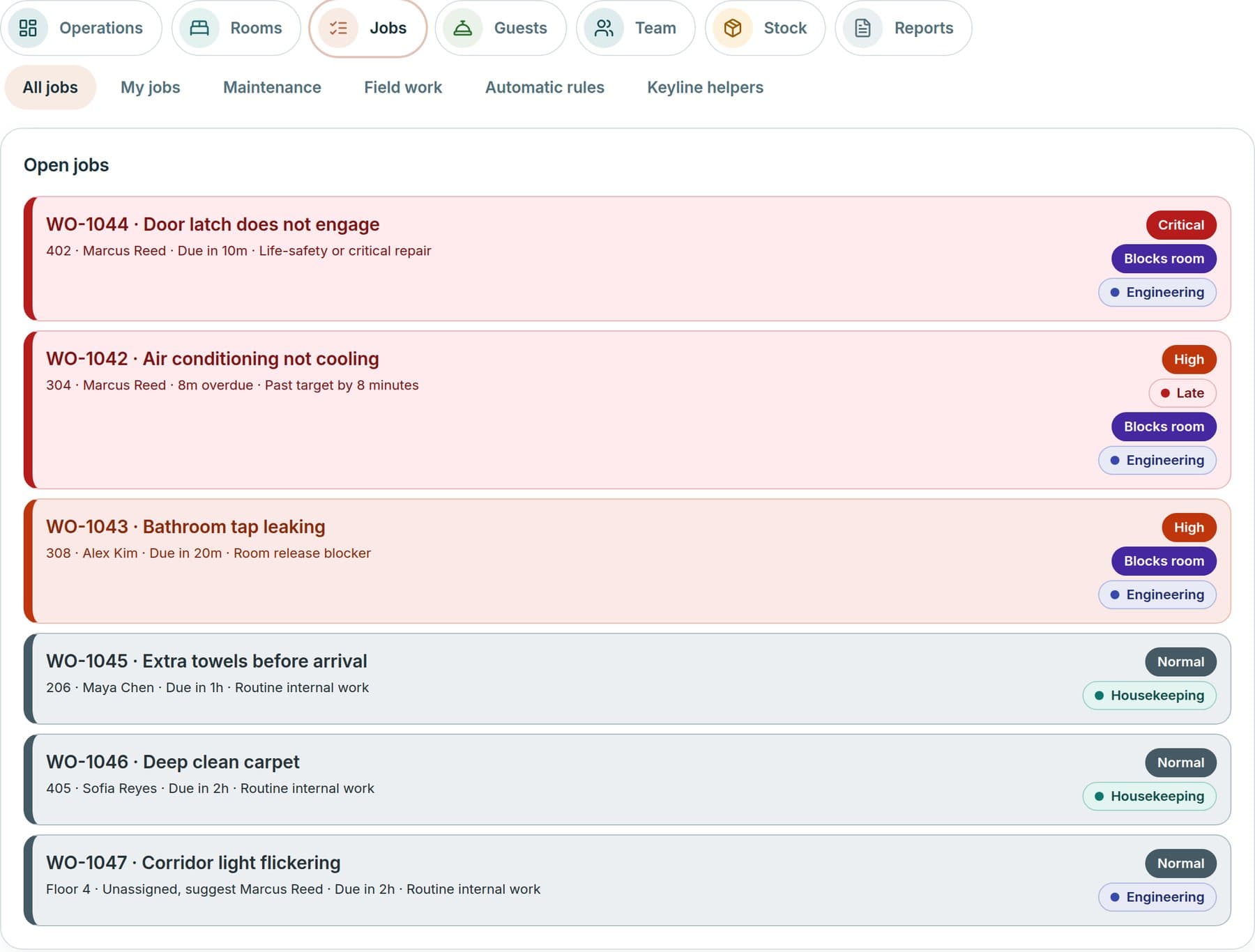
Roomline open jobs list with priority, owner, due time and whether a job blocks a room.
Example screen · Grand Harbour Hotel sample data
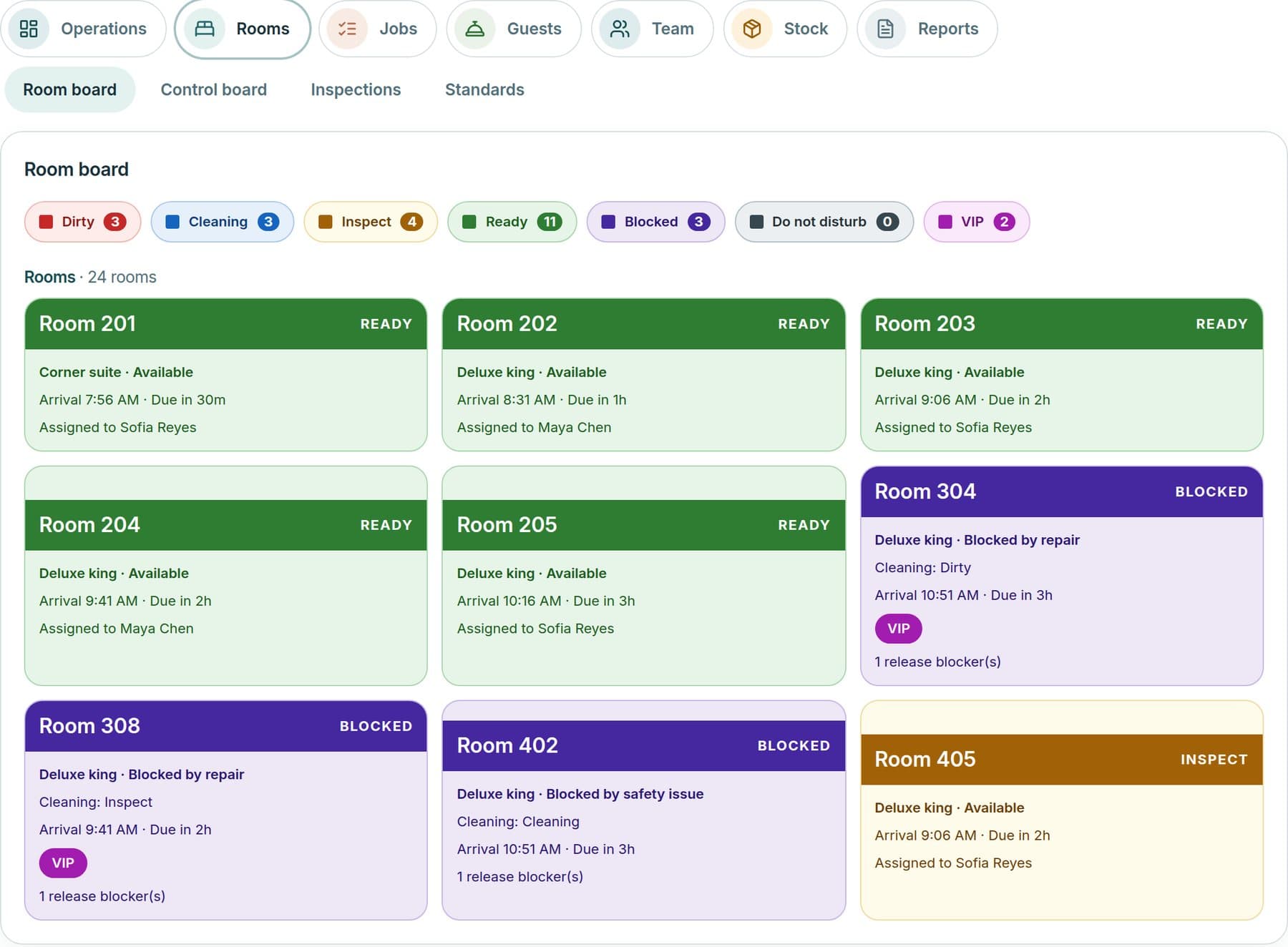
Roomline room board showing room status and readiness.
Example screen · Grand Harbour Hotel sample data
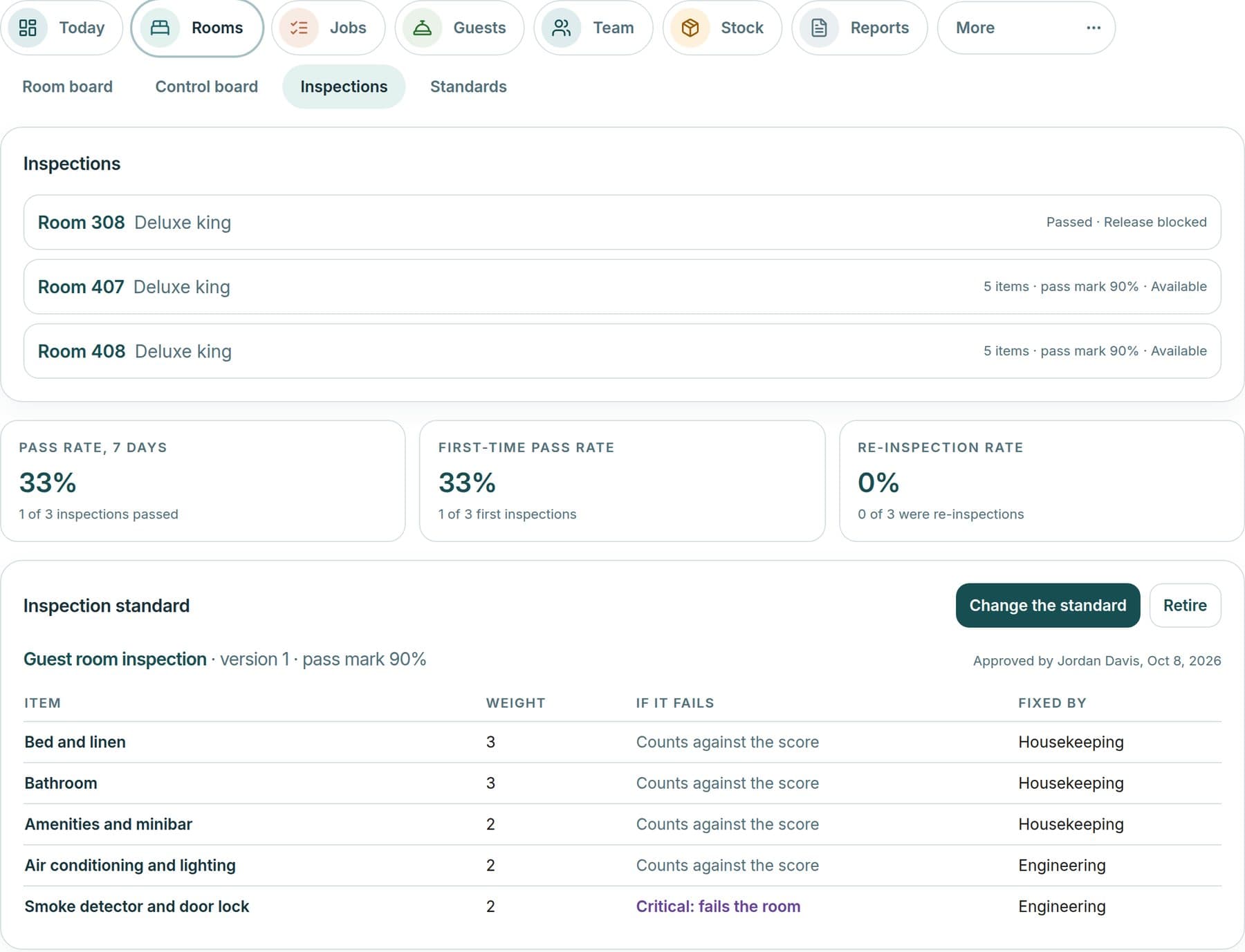
Roomline inspections view with checklists, findings and results.
Example screen · Grand Harbour Hotel sample data
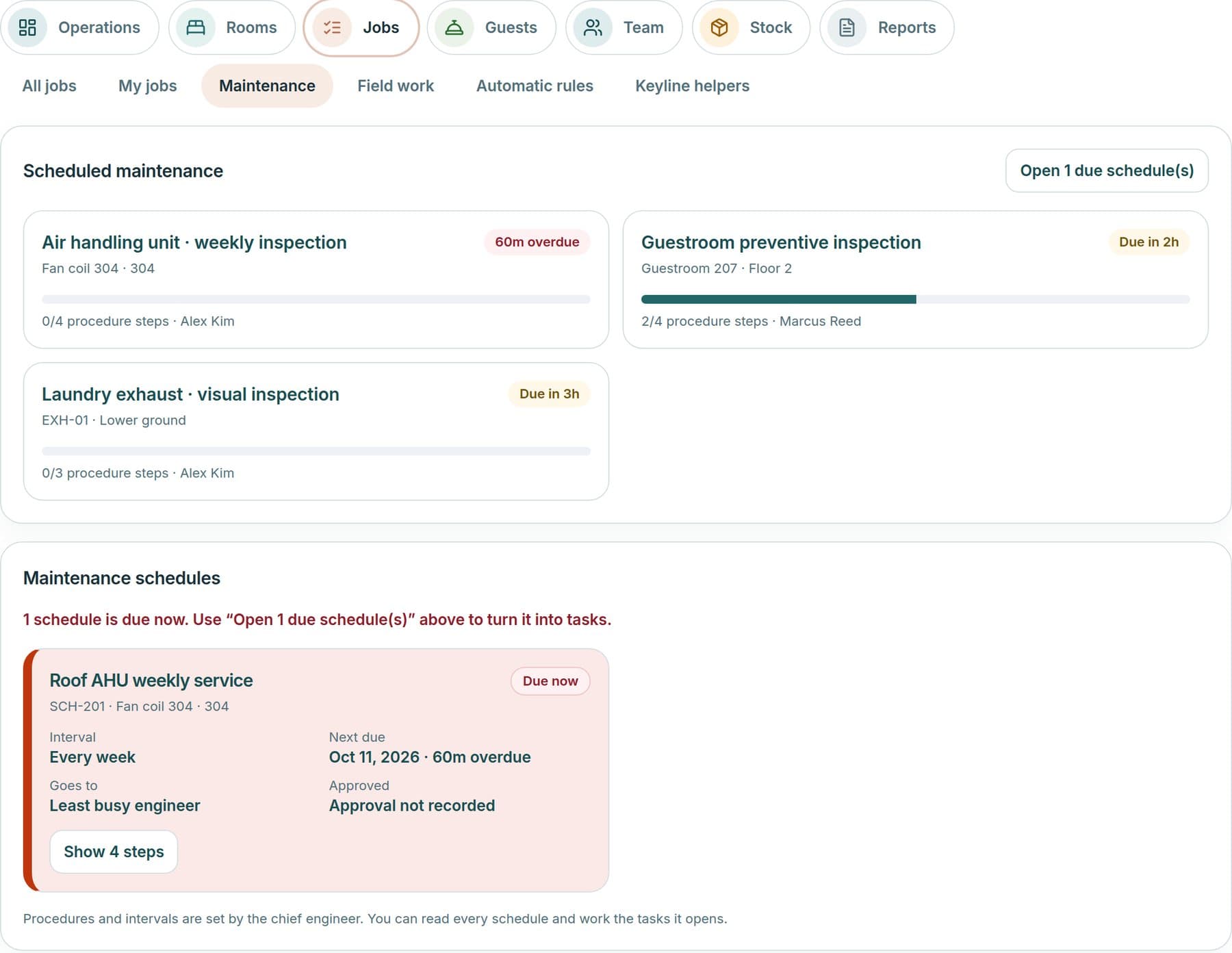
Roomline scheduled maintenance with overdue and upcoming services, procedure steps and the engineer responsible.
Example screen · Grand Harbour Hotel sample data

How a request becomes verified work

Requests reach the right desk, are assigned and tracked, and are closed only when someone has checked the result.

  1. Raise it

    Technology issues open a Service Desk ticket. Room, housekeeping and engineering requests open a Roomline job.

  2. Assign and track

    Each item gets an owner, a priority and a due time. One Work list shows tickets and jobs side by side, and a hand-off link carries a request from one to the other.

  3. Do the work

    Dispatch explains who should take a job and why. Checklists guide the work, and anything late or blocked rises to the needs-a-person list.

  4. Verify and close

    A supervisor verifies the result, and a room is released only when it passes inspection.

Today these are two desks that share one Work list. A single request form that routes automatically is planned.

What is included

Each line describes what the product does today.

Available
Built into the product.
Early access
Built and available to your hotel, still being proven with live hotels.
Planned
Not built yet.

Run the dayEarly access

  • Operations OverviewRooms ready, rooms held, open jobs, arrivals at risk and the work that needs a person now.
  • Operational PulseLive figures and a worst-first list of late, held or unowned work. Anything unmeasured shows as Unknown.
  • Operational AnalyticsTurnaround, response, on-time, workload and inspection measures, with CSV export.
  • Manager WorkspaceDepartment measures, reports and operating decisions for each department.
  • Supervisor WorkspaceTeam workload, inspections, a to-verify list and everything that needs a person.
  • Employee WorkspaceA simple My Day for each role, with task updates and in-app notices, installable as a web app.

Rooms and housekeepingEarly access

  • RoomlineA colour-coded room board with readiness, assignments, out-of-order status and each room’s history.
  • Housekeeping ManagementCleaning stages, a daily board and capacity-based assignments, with occupancy from a connected PMS.
  • Housekeeping ProductivityRoom credits, workload planning and fair assignments, with approvals for credit requests.
  • Room InspectionsWeighted checklists with critical items. A failure opens corrective work, and a room is released only when it passes.
  • Brand StandardsBrand, hotel, department and room-type standards with versions and inspection scores.
  • Front Office OperationsA front-desk view of the room board, guest requests, handover and follow-up. Guest names are shown only to this role.
  • Guest Request FulfillmentCapture a request once, match duplicates, assign it, track it and follow up.
  • PMS SynchronizationRead-only synchronization of rooms, reservations and housekeeping status from Oracle OPERA Cloud and Mews. Not yet validated against live hotels.

Engineering and maintenanceEarly access

  • Engineering ManagementWork orders, technician dispatch, ask-for-help escalation, parts and a recorded resolution.
  • Preventive MaintenanceRecurring schedules with step checklists. A failed step opens corrective work.
  • Equipment MaintenanceRepair history, recurring-fault flags, parts cost, warranty and meter readings for each piece of equipment.

Requests, jobs and service

  • Service DeskTickets, requests and approvals for hotel technology, with priority, category, owner and service targets.
  • Jobs ManagementEarly accessOpen, accepted, in progress, completed, verified and closed, with explained dispatch to the right person.
  • Unified Work ManagementEarly accessOne Work list that shows Service Desk tickets and Roomline jobs together, with a hand-off link from one to the other.
  • Incident ManagementEarly accessMajor-incident management with reviews for technology, and duplicate room requests linked under one lead job.
  • Escalation ManagementEarly accessConfigurable escalation rules for Service Desk tickets, and ask-for-help and late-work alerts in Roomline.
  • SLA ManagementEarly accessHotel-editable service targets with breach tracking for tickets, and start-by and finish-by times for jobs.
  • Service RecoveryEarly accessGuest follow-up, then a proposed, approved and completed recovery written in words. Nothing is sent to guests automatically.

Teams, standards and shiftsEarly access

  • Shift ManagementShift summaries, handover notes and on-duty marks, so the next team starts informed.
  • Workflow ApprovalsApprovals for changes, credit requests, service recovery and maintenance procedures, with a decision history.
  • Operational ChecklistsInspection, cleaning, preventive-maintenance and scheduled audit checklists.
  • Department SOPsDepartment and SOP-level standards written as checklists, with acknowledgements.
  • Operational CommunicationsJob transition notes and history, in-app notices and shift handover notes.
  • Mobile OperationsA phone-sized staff web app for tasks, inspections and handover, installable to the home screen. Each role sees its own next step first.

Planned

Not built yet, so not part of the product today.

  • One request intakePlannedA single request form that routes automatically to a ticket or a job.
  • Opening, closing and daily-routine checklistsPlannedChecklists for the routines that open and close each department.
  • Job comments and stored photosPlannedComment threads and stored photos and files on jobs, inspections and completion evidence.
  • Native mobile appsPlannediOS and Android apps for frontline teams.
  • Push notificationsPlannedAlerts delivered to a phone or tablet.
  • Shift rostersPlannedShift schedules and rosters.
  • Manager approvals inboxPlannedOne inbox for everything waiting on a manager’s approval.

Priced per room, so the cost grows only as the hotel does.

What it does for the hotel

See arrivals at risk

Rooms ready, rooms held and arrivals not yet ready sit in one view, so the team can act before the guest arrives.

Close the loop on every job

Each job has an owner, a due time and a verification step, so completed means checked.

Standards that drive inspections

Your own checklists and brand standards drive inspections, and a failure becomes corrective work.

Included with every product

The foundation all three products stand on.

  • Hotel WorkspaceOne workspace per hotel, with its own profile, records and context.
  • Multi-Property ManagementPortfolio, group and single-hotel views with combined rollups and an enterprise region and brand hierarchy.
  • Hotel OnboardingHotel profile, department interviews, context questions and user invitations, led by the Techorph team.
  • Department SetupDepartment mission, head, objectives with KPIs and a guided interview.
  • Employee DirectoryLicensed users with their role, hotels and departments.
  • Role-Based AccessOwner, Manager and Viewer roles with hotel and department scope, backed by row-level security.
  • Keyline Intelligence EngineRetrieval over the hotel’s own records that powers answers, recommendations and every module panel.
  • Evidence ManagementCoverage, confidence and missing evidence on every score, with documents confirmed by a person.
  • Approvals and Hand-offsApprovals and hand-offs inside each product, from tickets to changes, projects and policies.
  • Integration FrameworkScoped REST API keys, signed webhooks with retries, a credential vault and an MCP endpoint.
  • PMS ConnectorsEarly accessRead-only synchronization from Oracle OPERA Cloud and Mews. Not yet validated against live hotels.
  • NotificationsEmail reminders and in-app notices.
  • Secure Document IntakePrivate upload inbox with extraction and human confirmation.
  • Activity RecordsEvent logs inside each module, including access, tickets, budget and PMS activity.
  • Dashboards & ReportingRole views for the CIO, GM, CFO, owner and departments, with frozen report publications.
  • Executive IntelligenceOverview, executive view, recommendations and enterprise rollups. Unevidenced values show Unknown, never zero.
  • Security & Data IsolationEach organization’s and hotel’s data is kept apart with row-level security, and authenticator-app sign-in is supported.
  • Hotel CustomizationEarly accessHotel-written inspection checklists, standards and rules in Roomline, plus SOPs and policies.
  • Integrations AdministrationConnection health, last sync, errors and retry for each integration.
  • Mobile-Friendly WorkspaceA responsive workspace for phones and tablets.

See it with your own hotel

Book a demo and bring one current priority. We will show how it works with your systems and your teams.

Operations | Techorph HTMS™ | Techorph